



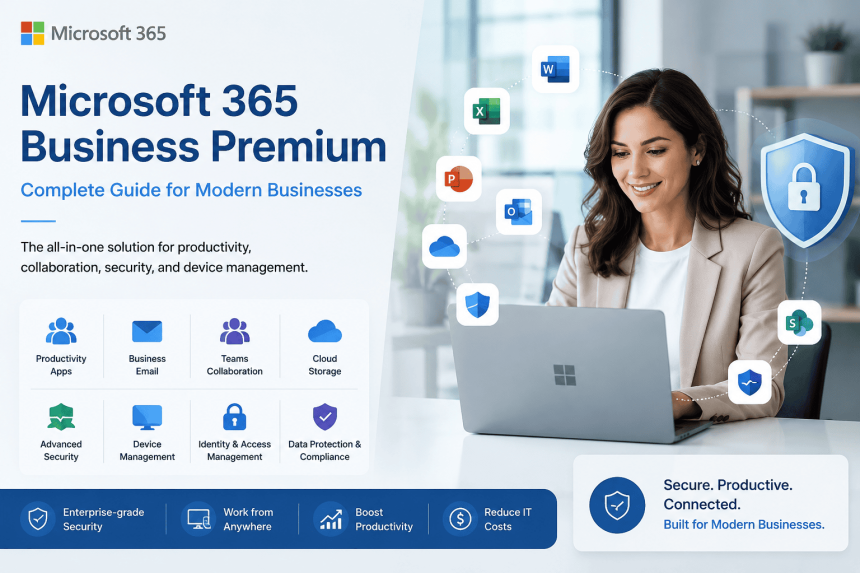
In today’s hybrid work environment, businesses require more than just email and Office apps. Organizations need secure collaboration tools, advanced cybersecurity, device management, and cloud productivity — all integrated into a single platform.
This is where Microsoft Business Premium becomes one of the most powerful solutions for small and medium-sized businesses.
In this guide, we will explain Microsoft 365 Business Premium features, benefits, security capabilities, and why businesses are upgrading from traditional office setups to a cloud-first workplace.
What is Microsoft 365 Business Premium?
Microsoft 365 Business Premium is a complete productivity and security solution designed for businesses with up to 300 users.
It combines:
- Office applications
- Business email
- Cloud storage
- Collaboration tools
- Endpoint management
- Identity protection
- Advanced security
into a single subscription.
Unlike standard productivity plans, Business Premium includes enterprise-grade cybersecurity and device management features.
Core Microsoft 365 Business Premium Features
1. Office Applications
Users get access to premium Office applications including:
- Word
- Excel
- PowerPoint
- Outlook
- OneNote
- Access (PC only)
- Publisher (PC only)
Applications can be installed on:
- Windows PCs
- Macs
- Tablets
- Smartphones
Each user can use apps across multiple devices.
2. Business Email with Exchange Online
Microsoft 365 Business Premium includes professional business email hosting.
Key Features:
- 50 GB mailbox per user
- Custom business domain email
- Shared mailboxes
- Calendar sharing
- Anti-spam protection
- Outlook integration
Example:
name@yourcompany.com
This provides a professional communication environment for organizations.
3. Microsoft Teams Collaboration
Microsoft Teams is included for:
- Team chat
- Video meetings
- File sharing
- Internal collaboration
- Webinars
- Voice calls
Teams Features Include:
- HD video conferencing
- Meeting recording
- Screen sharing
- Team channels
- Live collaboration
- Integration with Office apps
This helps businesses support hybrid and remote work environments efficiently.
4. OneDrive Cloud Storage
Each user receives:
- 1 TB OneDrive storage
Employees can:
- securely store files,
- sync documents,
- access files remotely,
- collaborate in real time.
Cloud storage reduces dependency on local systems and improves business continuity.
5. SharePoint Online
Microsoft SharePoint helps organizations create:
- intranet portals,
- department sites,
- document libraries,
- workflow systems.
Businesses can centralize document management securely.
6. Microsoft Defender for Business
One of the biggest advantages of Business Premium is built-in cybersecurity.
Microsoft Defender for Business provides:
- Endpoint protection
- Ransomware protection
- Threat detection
- Antivirus
- Attack surface reduction
- Device security monitoring
This gives enterprise-grade security without requiring separate antivirus investments.
7. Microsoft Intune Device Management
Microsoft Intune enables centralized device management.
IT teams can:
- manage laptops and mobile devices,
- enforce security policies,
- deploy applications,
- wipe lost devices remotely,
- monitor compliance.
This is extremely useful for hybrid and remote workforce management.
8. Microsoft Entra ID (Azure AD)
Microsoft Entra ID helps secure user identities.
Security Features Include:
- Multi-factor authentication (MFA)
- Conditional access
- Single sign-on (SSO)
- Identity protection
- User access control
This significantly improves account security.
9. Advanced Security Features
Microsoft 365 Business Premium includes several advanced protection features:
Security Capabilities
- Email threat protection
- Anti-phishing protection
- Safe links
- Safe attachments
- Device encryption
- Data protection policies
- Access control
Businesses handling sensitive customer or financial data benefit greatly from these protections.
10. Mobile Device Management (MDM)
Organizations can securely manage:
- Android devices
- iPhones
- Tablets
- Corporate laptops
This ensures business data remains protected even on employee-owned devices.
Benefits of Microsoft 365 Business Premium
Improved Productivity
Employees can work from anywhere with seamless collaboration tools.
Enhanced Security
Built-in cybersecurity reduces risk from ransomware, phishing, and malware attacks.
Lower IT Costs
Businesses can avoid investing in multiple third-party security and collaboration tools.
Centralized Management
Admins can manage users, devices, policies, and applications from one dashboard.
Scalability
Organizations can easily add or remove users as business needs change.
Who Should Use Microsoft 365 Business Premium?
This plan is ideal for:
- Small businesses
- Mid-sized companies
- Hybrid workforce organizations
- Remote teams
- Professional service firms
- Healthcare organizations
- Educational institutes
- IT companies
- Financial firms
Especially businesses that require strong security and centralized management.
Microsoft 365 Business Premium vs Business Standard
| Feature | Business Standard | Business Premium |
|---|---|---|
| Office Apps | Yes | Yes |
| Teams | Yes | Yes |
| Exchange Email | Yes | Yes |
| Intune | No | Yes |
| Defender for Business | No | Yes |
| MFA & Identity Security | Limited | Advanced |
| Device Management | No | Yes |
| Endpoint Security | No | Yes |
Business Premium is ideal for organizations requiring advanced cybersecurity and device control.
Why Businesses Are Migrating to Microsoft 365
Modern organizations are moving away from:
- local servers,
- unmanaged devices,
- traditional office systems,
- fragmented security tools.
Microsoft 365 provides:
- cloud-first infrastructure,
- collaboration,
- automation,
- centralized security,
- operational flexibility.
This makes it one of the most widely adopted business productivity platforms globally.
Final Thoughts
Microsoft 365 Business Premium is much more than an Office subscription. It combines productivity, collaboration, identity management, cybersecurity, and endpoint protection into a unified business platform.
For organizations looking to modernize operations while improving security and employee productivity, Microsoft 365 Business Premium is one of the best investment choices available today.
Whether your business is implementing cloud transformation, hybrid work, or cybersecurity improvements, Business Premium provides a scalable and secure foundation for future growth.