


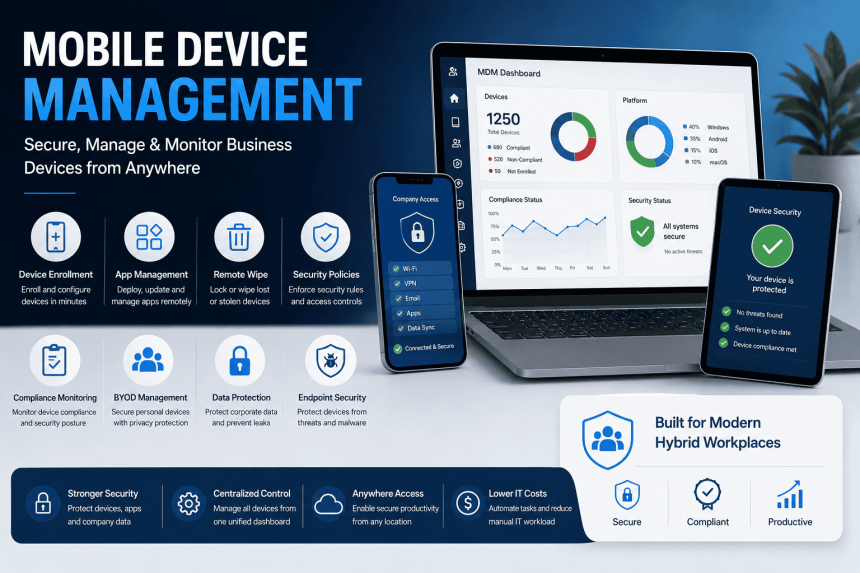
Mobile Device Management, commonly known as MDM, helps businesses securely manage laptops, smartphones, tablets, and other endpoints used by employees.
As hybrid work, remote teams, and BYOD policies become common, organizations need better control over business devices, apps, user access, and company data.
MDM provides a centralized way to secure and manage devices from one platform.
What is Mobile Device Management?
Mobile Device Management is a solution that allows IT teams to enroll, configure, monitor, and secure employee devices.
It helps businesses manage:
- Windows laptops
- Mac devices
- Android phones
- iPhones
- Tablets
- Company-owned devices
- Employee-owned BYOD devices
Key Mobile Device Management Features
1. Device Enrollment
MDM allows businesses to register devices into a centralized management system.
This helps IT teams identify which devices are connected to company systems.
2. Security Policy Management
Admins can enforce security rules such as:
- Password policies
- Screen lock rules
- Device encryption
- Antivirus settings
- Firewall policies
- USB restrictions
3. App Management
MDM helps IT teams deploy, update, or remove business applications remotely.
This is useful for tools like Microsoft 365, Teams, Outlook, VPN, antivirus, CRM apps, and internal business applications.
4. Remote Lock and Wipe
If a device is lost or stolen, IT admins can remotely lock the device or wipe business data.
This reduces the risk of data leakage.
5. Compliance Monitoring
MDM checks whether devices follow company security rules.
Non-compliant devices can be blocked from accessing business email, apps, or cloud data.
6. BYOD Management
For employee-owned devices, MDM can separate personal data from company data.
This allows businesses to protect corporate information without disturbing personal files.
7. Data Protection
MDM helps protect business data through access controls, encryption, app restrictions, and conditional access policies.
8. Centralized Dashboard
IT teams can manage all devices from a single admin console.
This improves visibility and reduces manual IT work.
Benefits of Mobile Device Management
- Better Security
MDM reduces risks from lost devices, weak passwords, malware, and unauthorized access.
- Improved IT Control
Admins can manage users, apps, devices, and policies remotely.
- Support for Remote Work
Employees can securely access company apps and data from anywhere.
- Reduced Data Leakage
Company data can be protected, restricted, or removed from unmanaged devices.
- Easier Compliance
MDM helps businesses follow internal security and compliance requirements.
Who Needs Mobile Device Management?
MDM is useful for:
- IT companies
- Sales teams
- Field teams
- Healthcare businesses
- Financial firms
- Schools and colleges
- Manufacturing companies
- Remote teams
- Enterprises with BYOD policies
Popular MDM Solutions
Some widely used MDM platforms include:
- SureMDM
- Microsoft Intune
- ManageEngine Endpoint Central
- VMware Workspace ONE
- Jamf
- SOTI MobiControl
- IBM MaaS360
Final Thoughts
Mobile Device Management is no longer optional for modern businesses. With employees using multiple devices across different locations, companies need strong control over security, apps, access, and compliance.
MDM helps organizations protect company data, simplify IT operations, and support secure hybrid work environments.